

Court systems today are under more pressure than ever. Caseloads are rising, experienced staff are retiring faster than they can be replaced, and the expectations around remote and hybrid work have permanently reshaped how court teams operate. Meanwhile, artificial intelligence is beginning to change what’s possible — not just in how cases are processed, but in how work gets assigned, tracked, and completed. In the middle of all of this change, one question keeps surfacing: how do you keep cases moving when your resources, your people, and your processes are all in flux?
The answer, more often than not, comes down to workflow and whether yours is actually built for the world courts operate in today. An outdated or poorly configured workflow doesn’t just slow things down; it creates bottlenecks that compound under pressure, exposes gaps when key staff are unavailable, and leaves supervisors flying blind when they need visibility the most. This post breaks down what separates a truly intelligent workflow engine from the alternatives, what features to look for (and what red flags to avoid), and how the right tool can help your court do more with what you have.
What Modern Workflows Should Actually Do
Not all workflow tools are created equally, and the gap between a basic task list and a truly intelligent workflow engine has never been wider. Before evaluating any tool, it helps to define the standard. Here’s what a modern court workflow should deliver:
- Collaboration across every stakeholder. Cases don’t live from start to finish in one place. From filing to disposition, they touch multiple agencies, departments, teams, and individuals, many of whom may be working remotely or across jurisdictions. An effective workflow tool must be able to assign tasks and resources to all collaborators, not just those in your building. If your tool can’t follow the case wherever the work happens, it’s already falling short.
- Continuous monitoring. Not just milestone check-ins. When work is assigned, your workflow tool shouldn’t sit idle waiting for someone to manually update a status. It should monitor progress in the background and automatically trigger the next phase when milestones are met. This distinction (active monitoring vs. passive record-keeping) is one of the clearest indicators of whether a workflow engine is built for modern court operations.
- Proactive alerts before problems become backlogs. If a case isn’t moving the way it should, you need to know about it before it becomes a problem. The right tool will surface delays, flag obstacles, and alert the right people at the right time, whether that’s for a single case or across your entire docket. In an environment where staff shortages are real and caseloads are growing, reactive tools simply aren’t enough.
- Workflow-aware search. Finding case details is table stakes. What courts need is search that’s specific to the workflow itself, including the ability to surface tasks, resources, statuses, and dependencies quickly and without friction. If your team is spending time hunting for information that should be at their fingertips, that’s time not spent advancing cases.
These aren’t nice-to-haves. In a court environment shaped by rising caseloads, leaner teams, and increasing public scrutiny, they’re the baseline.
When Workflows Work Against You: The Real Cost of Getting It Wrong
Workflow is one of those things that’s easy to overlook when it’s working and impossible to ignore when it isn’t. The problem is that poor workflow rarely announces itself all at once. It shows up gradually as a status that didn’t update, a task that fell through the cracks, or a deadline that got missed because nobody got an alert. By the time the pattern becomes visible, the damage is already done.
If you’re evaluating your current tool or shopping for a new one, here are the red flags that signal a workflow engine that’s working against you, not for you.
- Over-reliance on ticklers. Ticklers have their place, but when they’re the primary mechanism for moving work forward, you’ve already hit a ceiling. Ticklers are reactive and one-dimensional. They remind someone that something is due, but they can’t account for resources, dependencies, or what happens when the reminder gets ignored. They also offer no visibility into the bigger picture, making it nearly impossible to spot systemic delays or resource gaps before they become crises.
- Manual tools fill the gaps. If your team is relying on spreadsheets, sticky notes, or shared inboxes to compensate for what your workflow tool can’t do, that’s not a workaround; that’s a warning sign. Manual processes introduce duplicate work and manual data entry where automation should be doing the heavy lifting. Every manual handoff is an opportunity for something to get lost, miscommunicated, or forgotten entirely.
- Rigid processes that can’t bend. Court operations are rarely predictable. Exceptions, continuances, jurisdictional variations, and legislative changes are part of the job, and a workflow tool that can’t accommodate them will force your staff to work around the system rather than through it. Rigid workflows don’t just slow things down; they quietly train your team to stop trusting the system, which creates its own set of problems.
- Limited visibility at every level. If supervisors can’t see where cases stand without asking someone, or if staff can’t quickly find the tasks and statuses relevant to their work, the workflow tool has failed at its most basic job. Poor visibility doesn’t just create frustration; it increases the risk of errors, obscures accountability, and places unnecessary strain on the people who are already stretched thin.
Over time, these inefficiencies compound. What starts as a minor friction point becomes a structural drag on your court’s capacity.
What a Purpose-Built Workflow Engine Looks Like
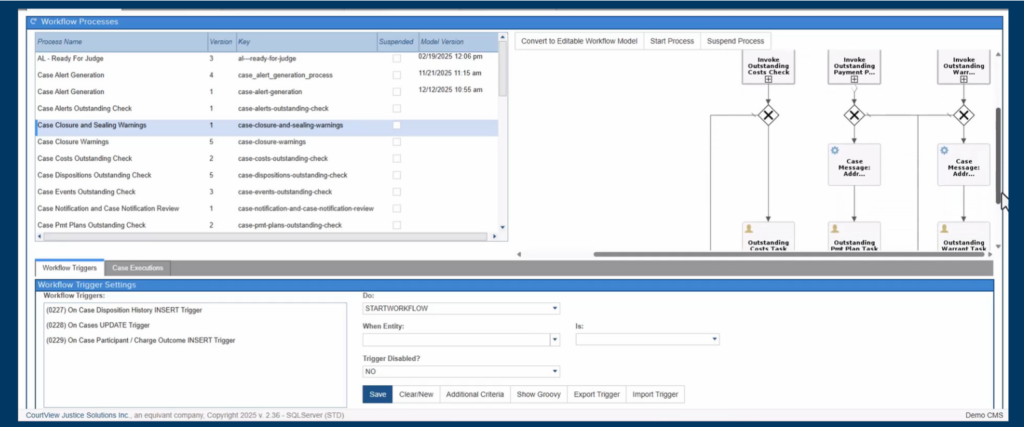
Once you understand the limitations of basic or manual workflows, the next step is identifying tools built specifically for real-world court operations rather than generic business process tools that have been loosely adapted for a court environment. The difference matters more than most people realize.
equivant JWorks was designed from the ground up to give courts visibility, flexibility, and control over how work moves from start to finish, without requiring technical expertise or ongoing vendor dependence. Too many courts find themselves locked in a cycle where every process change, every new workflow, or every small adjustment requires a call to the vendor and a line item on an invoice. JWorks was built to break that cycle.
Here’s what that looks like in practice:
You configure it. JWorks lets your team build and modify workflows based on your business processes without writing a single line of code. A graphical design tool lets you visually lay out the steps, resources, dependencies, timers, and triggers that make up your caseflow, so the people who understand your court’s operations are the ones shaping how work gets done.
You can see the work, not just track it. One of the most underrated aspects of good workflow design is visibility, not just knowing that a case is “in progress,” but understanding exactly where it is, who has it, what’s next, and whether it’s on track. JWorks gives supervisors and staff a clear, graphical view of where cases stand on their assigned track, making it far easier to spot delays, redistribute work, and make informed decisions in real time.
You build for exceptions, not just the ideal path. Real court operations are full of variables like continuances, jurisdictional differences, legislative changes, and case-specific exceptions. JWorks supports conditional logic (if, else, or, then) so you can build those real-world scenarios directly into your workflows rather than creating one-off workarounds every time something doesn’t follow the standard path.
You assign work based on how your court is actually structured. Whether work needs to go to an individual, a team, a department, or an external agency, JWorks supports flexible assignments and tracks that work through to completion. Nothing falls through the cracks because it was assigned to a role that didn’t get the message.
You test before you commit. Before any new or updated workflow goes live, JWorks lets you test processes, assignments, triggers, and timers in a controlled environment.
You stay informed automatically. From audit trails and task completion logs to delay flags and caseflow reporting, JWorks keeps a complete record of how work moves through your system (across one case, some cases, or all of them). When accountability matters, the data is there.
And when your processes change, because they will, JWorks is designed to change with you quickly, without a lengthy implementation cycle or vendor involvement.
The Right Workflow Changes Everything
Workflow is the infrastructure that determines whether your court can keep pace with rising caseloads, adapt to staffing changes, and deliver consistent outcomes for the communities you serve. If you’re dealing with visibility gaps, stretched staff, processes that can’t keep up with change, or a tool that leans too heavily on your vendor, it’s worth having a conversation. Ready to see what a smarter workflow looks like for your court? Get in touch with our team today.